AI Requirements Generation (ReqGen)
Video transcript
00:04 — Two ways to start
Requirements begin one of two ways. Generate with AI drafts the entire document from a single prompt — every applicable category of the V-model in one pass. Or build it yourself, from a blank document or a CSV import, with the agent on call to interview you and draft, category by category. Either way you end up with the same structured, change-controlled document.
00:36 — A complete, categorised document
Here is a generated document. Requirements come out grouped by category — functional, power, safety, thermal, EMC, environmental and more — and every one carries a stable, traceable ID from the moment it is written, checked against design-input standards. A day of writing becomes a ninety-second draft that a reviewer refines.
01:07 — Refine, under change control
Refine it however you like — edit inline, add from the category cards, or set Document Info, the purpose and scope every export carries. And every document is change-controlled: branch a follow-on to explore a change, and every save is a revision you can compare — the diff panel shows exactly what was added, removed or edited, line by line.
01:35 — The agent, pinned to your document
And the agent is always on call, pinned to whatever document you have open. Ask it to interview you, draft requirements, or trace them up to their parents. It batches its changes into a follow-on you review in the diff panel and merge — never a silent edit. Requirements you can trust, from the first line to the last.
What it does
Given a hierarchy node and a short natural-language prompt, ReqGen produces a structured set of requirements aligned to V-model level (system, work-package, subsystem, assembly, subassembly), grouped into ~30 categories (functional, safety, EMC, thermal, security, etc.).
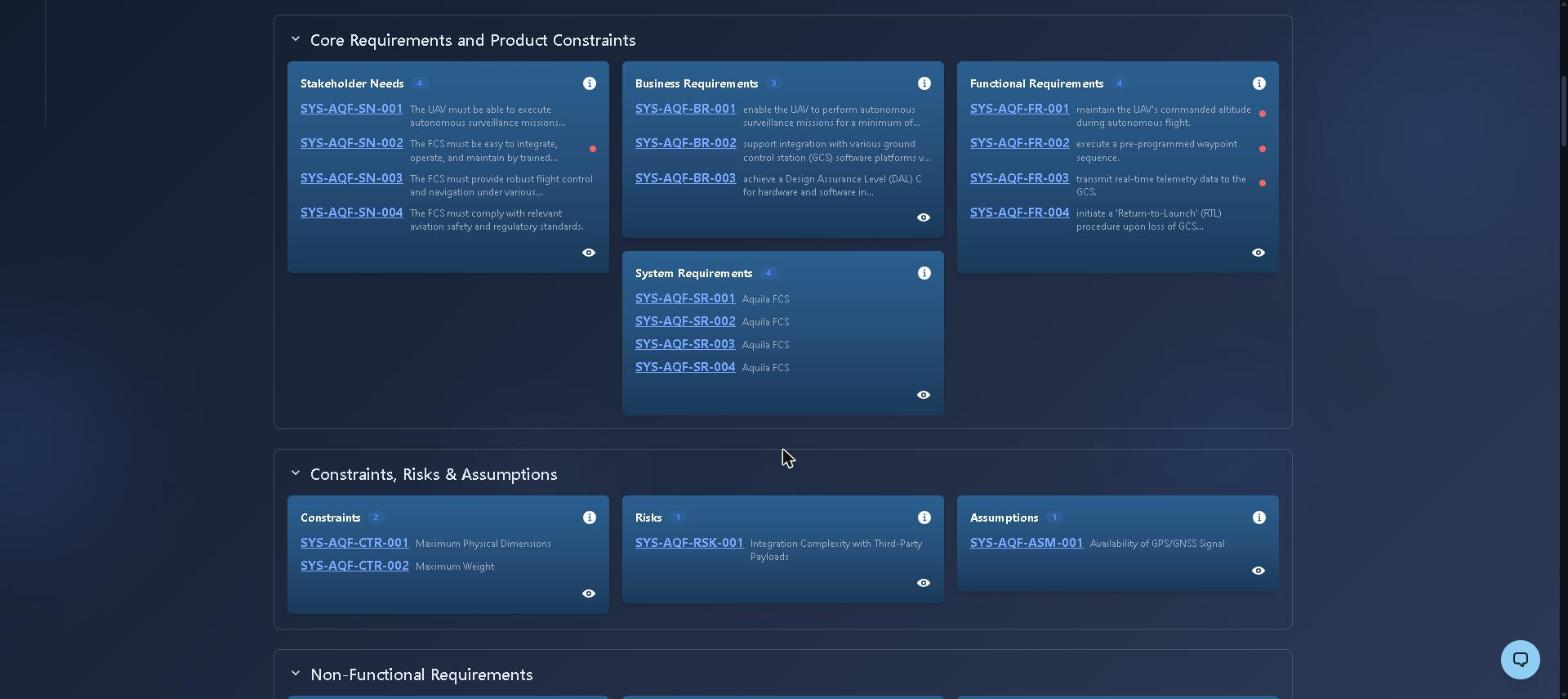
Requirements are grouped by category and carry stable IDs (SYS-AQF-FR-001) from the moment they are drafted, so traceability links survive every later edit.
Why it matters
A typical engineer spends 8–12 hours producing the first-pass requirements set for a new subsystem. ReqGen does it in 90 seconds, with category coverage that exceeds what most engineers produce manually.
How it works
- Pick a hierarchy node (e.g., Battery Management Subsystem under EV Powertrain).
- Type a short prompt: "Lithium-ion BMS for 400V automotive pack, ASIL-D."
- Choose categories (defaults are level-aware) and generation depth.
- ReqGen calls the LLM with a level- and category-composed template, returns a structured JSON document.
- Engineers review, comment, and iterate — every change tracked.
Key capabilities
- Per-category granularity: 30+ category modules including ASIL-driven safety, EMC, biocompatibility, sterilization (medical), automotive EMC.
- Hierarchy-aware: Inherited context from parent nodes flows in automatically.
- Re-generation with diff: Edit prompt → regenerate → see colored diff vs. previous draft.
- Review-first workflow: Submit for review, route to assigned reviewers, accept/reject per comment.
Requirement quality checks
Generating requirements quickly is only useful if they are good requirements, so every requirement is linted against deterministic quality checks drawn from AS9100 8.3.3 (design inputs must be complete, unambiguous and non-conflicting) and DO-178C review objectives:
- missing acceptance criteria (the requirement is unverifiable as written)
- missing verification method
- placeholder text left behind (TBD / TODO / ???)
- vague or subjective wording
- exact duplicates of another requirement
Findings are severity-calibrated by how certain the defect is. Clear-cut defects are blocking — they surface as review comments, and open critical or major comments prevent baselining. Heuristic nudges are advisory, so a reviewer can accept them and move on. The checks are deterministic rather than model-driven, so the same text always produces the same result — which is what makes them defensible in an audit.
Traceability
Requirements carry typed traceability links to their parents, children and related artifacts. Links created by AI generation are reconciled into a single authoritative link store alongside links you create by hand or import, so the coverage views — VCRM, validation matrix, cross-level traceability — reflect one consistent picture rather than three partial ones.
Usage limits
Generation is metered per tool, per plan:
| Plan | Limit |
|---|---|
| Free | 1 generation per tool, lifetime — enough to evaluate the output quality, not to run a project |
| Professional | 10 per day |
| Team | 25 per day |
| Enterprise | 100 per day |
Free-plan artifacts are public. Setting an artifact private requires a paid plan. Editing, reviewing and exporting are not metered — only AI generation is.