Engagement Intake
Triage an incoming work package before committing to it.
What it's for
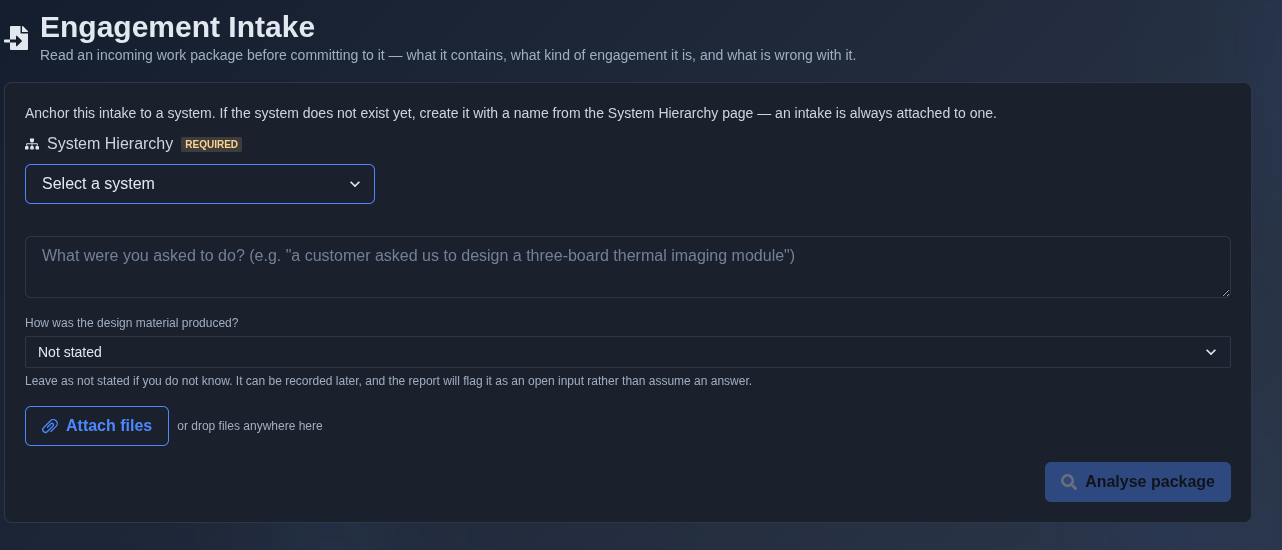
Engagement Intake reads an incoming work package before the team commits to it. Anchor the intake to a System Hierarchy node, describe what you were asked to do, indicate how the design material was produced, and attach the incoming files. Click “Analyse package” and the tool produces an AI-generated report covering what the package contains, the likely engagement type, how the supplied material was produced, what was supplied or missing, the scope and effort, and any open questions or blocking gaps — giving the team the information needed to decide how to proceed with the engagement.
When to use it
When a customer or partner sends you a work package and you need to know what is in it, what is missing, and whether to commit.
How it works
-
Create an engagement intake. → Select the required system from “System Hierarchy,” enter what you were asked to do in the description field, select how the design material was produced, optionally attach supporting files, and click “Analyse package” to analyse the incoming work package.
▶ Initial state▼ Initial state
-
What is package → Review the “What this package is” section to understand what the supplied package contains, how it relates to the stated engagement objective, and any contradictions or missing documentation identified by the analysis.
▶ What is package▼ What is package

-
Engagement-type → Review the “Engagement type” section to see the selected engagement archetype and its fit percentage. Compare the listed archetypes, their fit percentages, and the signals that fired for each classification.
▶ Engagement-type▼ Engagement-type

-
How it was produced → Review the “How it was produced” section to see the selected production method for the supplied design material. The available options are “Not stated,” “Engineered by hand,” “Generated by a tool,” and “Mixed.”
▶ How it was produced▼ How it was produced

-
What was supplied → Review the “What was supplied” section to see the supplied files, including each file ID, filename, how the file was identified, and the method or signal used to identify it.
▶ What was supplied▼ What was supplied

-
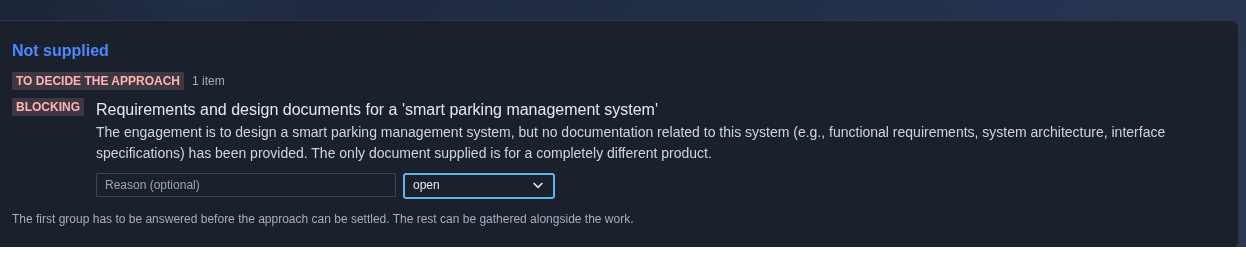
Not supplied → Review the “Not supplied” section to identify missing information or documentation required to decide the engagement approach. Review the severity or status of each missing item, its description and reason, and the available controls for providing a reason or updating its status.
▶ Not supplied▼ Not supplied
-
Scope and effort → Review the “Scope and effort” section to see whether the findings have been converted into work packages. If no breakdown exists, use “Derive from the gap report” to derive work packages from the identified gaps, with each work package linked to the finding that makes it necessary.
▶ Scope and effort▼ Scope and effort

-
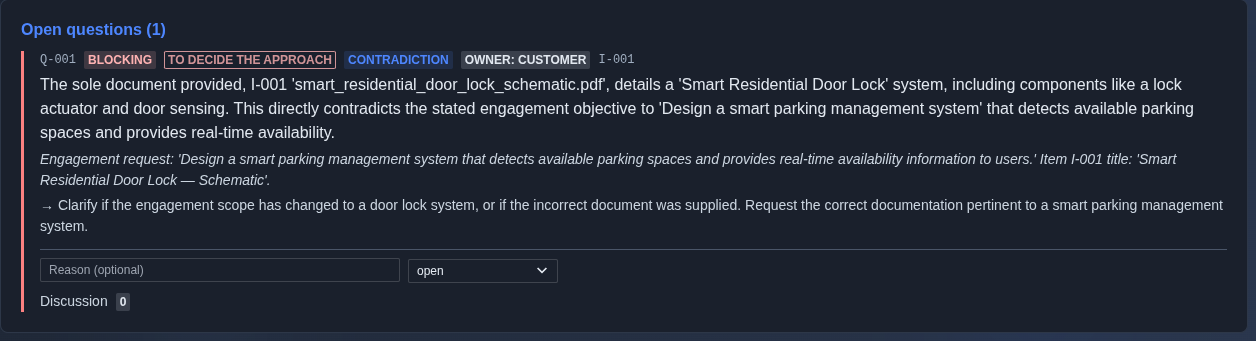
Open questions → Review the “Open questions” section to identify unresolved questions that may block the engagement approach. Review each question’s ID, status, category, owner, and related supplied item, along with the question details and requested clarification. Enter an optional reason and update the question status as appropriate, and review any discussion associated with the question.
▶ Open questions▼ Open questions
-
Export the engagement intake analysis. → Click “Export” and select the required output format: “PDF” for a formatted PDF with a cover page and page numbers, “CSV Spreadsheet” for Excel or Google Sheets, or “JSON Data” for structured data.
▶ Export▼ Export

Mechanics
- System Hierarchy anchor (required) — every intake is attached to a system
- Free-text engagement description for incoming work-package context
- Design-material provenance selector — Not stated · Engineered by hand · Generated by a tool · Mixed
- File attachment for incoming work-package material
- AI-generated package analysis covering package contents, engagement type, supplied and missing information, scope and effort, and open questions
- Open inputs and blocking gaps identified before the engagement approach is settled
- Export: PDF · CSV Spreadsheet · JSON Data