RCCA
Video transcript
00:04 — RCCA
When something fails, RCCA takes you from symptom to true root cause to a fix — with the agent doing the structured work. Start a blank RCCA, describe the failure, and ask the agent to draft it. Approving as it goes, it writes the problem statement, works the five-whys and fishbone, and proposes containment and permanent corrective actions — so the investigation is structured and the fix is documented, not just remembered.
Six analysis frameworks on one problem, in one artifact.
What it's for
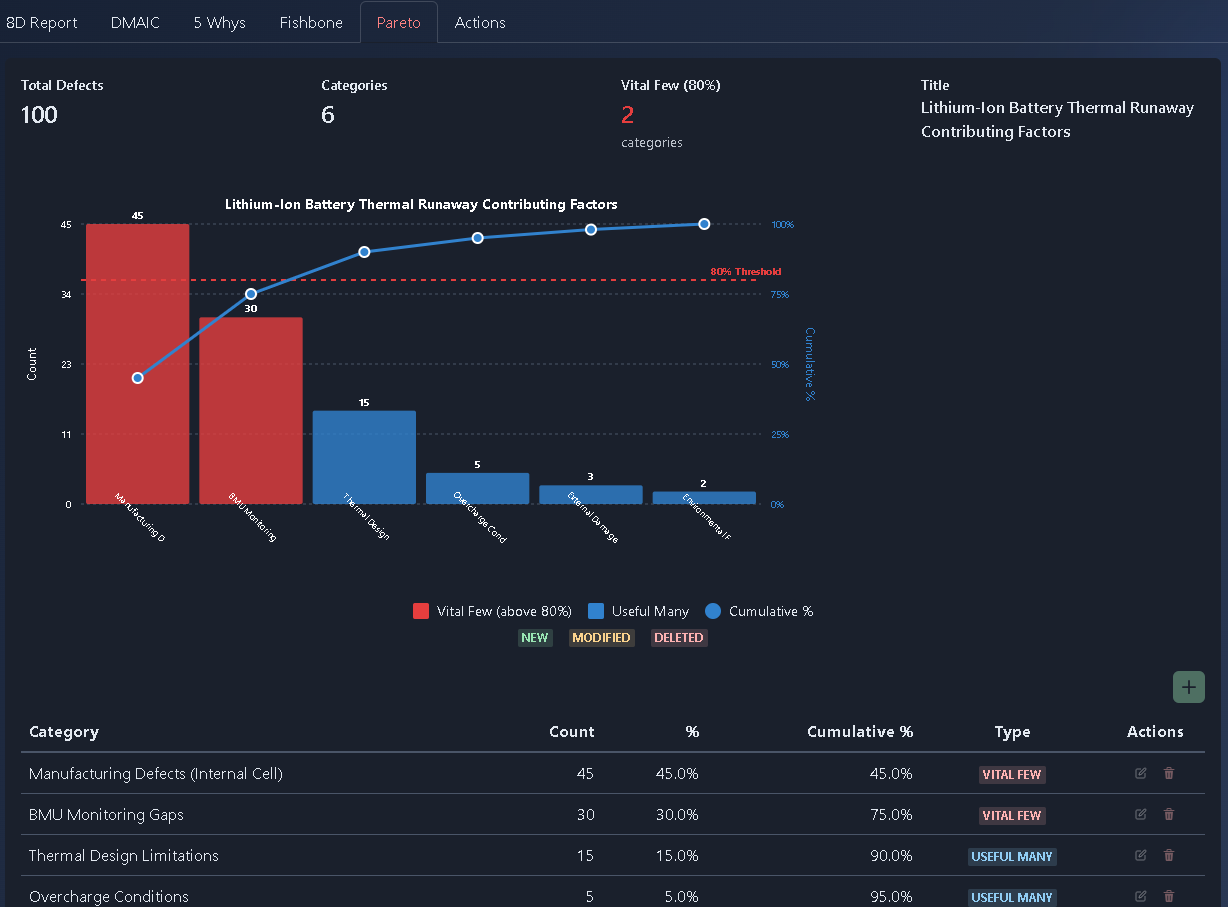
RCCA runs six methodologies in parallel on the same problem — an 8D Report (D0–D8), DMAIC, 5 Whys, a real SVG Fishbone (Ishikawa) diagram, a Pareto chart with an 80% “vital few” line, and a Corrective Actions summary — giving stakeholders multiple views of the root cause, analysis, and corrective actions.
When to use it
Use RCCA for field failures, production escapes, customer complaints, and other significant quality or reliability issues, particularly in regulated and safety-critical industries where structured root-cause analysis and corrective actions are required.
How it works
-
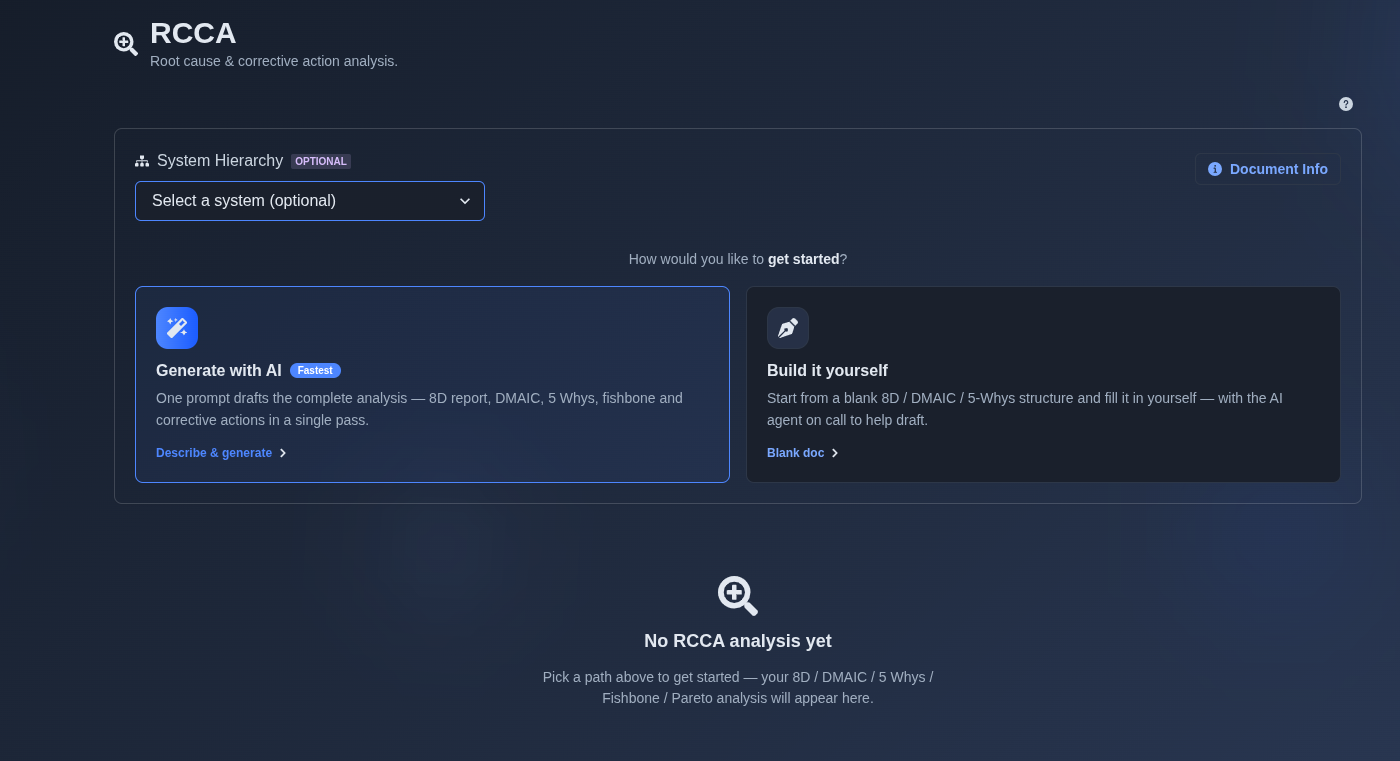
Generate with AI or build it yourself. → Select “Generate with AI” or “Build it yourself.” If “Generate with AI” is selected, enter a prompt describing the problem, failure, or issue for which you want to perform a Root Cause and Corrective Action (RCCA) analysis. The AI uses the provided information to generate an initial RCCA analysis, including relevant 8D, DMAIC, 5 Whys, Fishbone, and corrective-action content. If “Build it yourself” is selected, optionally select a system from the System Hierarchy, attach supporting files as reference material, and choose “Create a blank document” to start with an empty RCCA structure and fill in the analysis manually.
▶ Intial state▼ Intial state
-
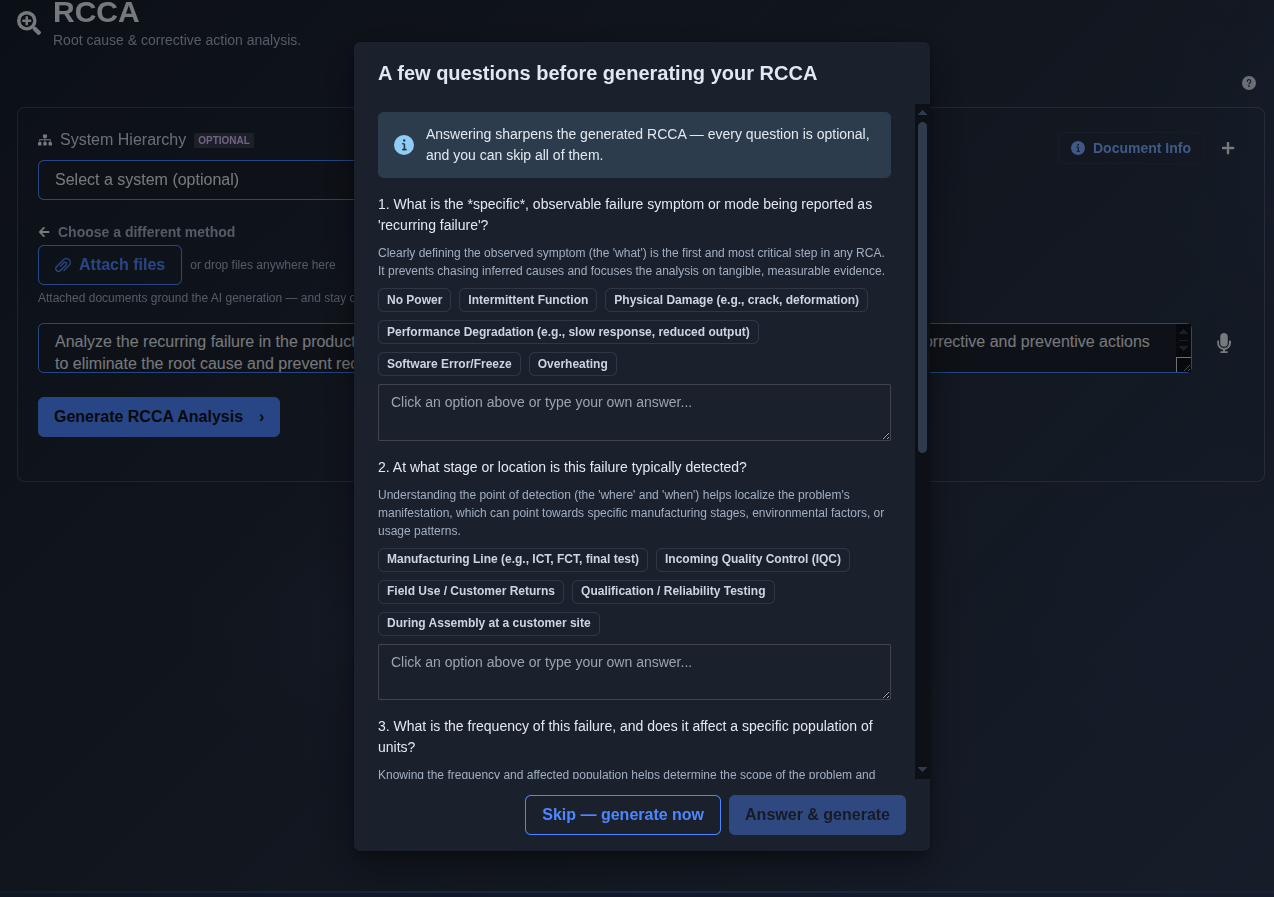
Enter a prompt and answer the AI questions. → Enter a prompt describing the problem, failure, or issue in the prompt input area and run the prompt. The AI may ask additional questions to better understand the problem and generate a more accurate RCCA analysis. Answer the questions based on the available information, or select “Skip — generate now” to skip the questions and generate the RCCA using the information already provided.
▶ Answer the AI questions.▼ Answer the AI questions.
-
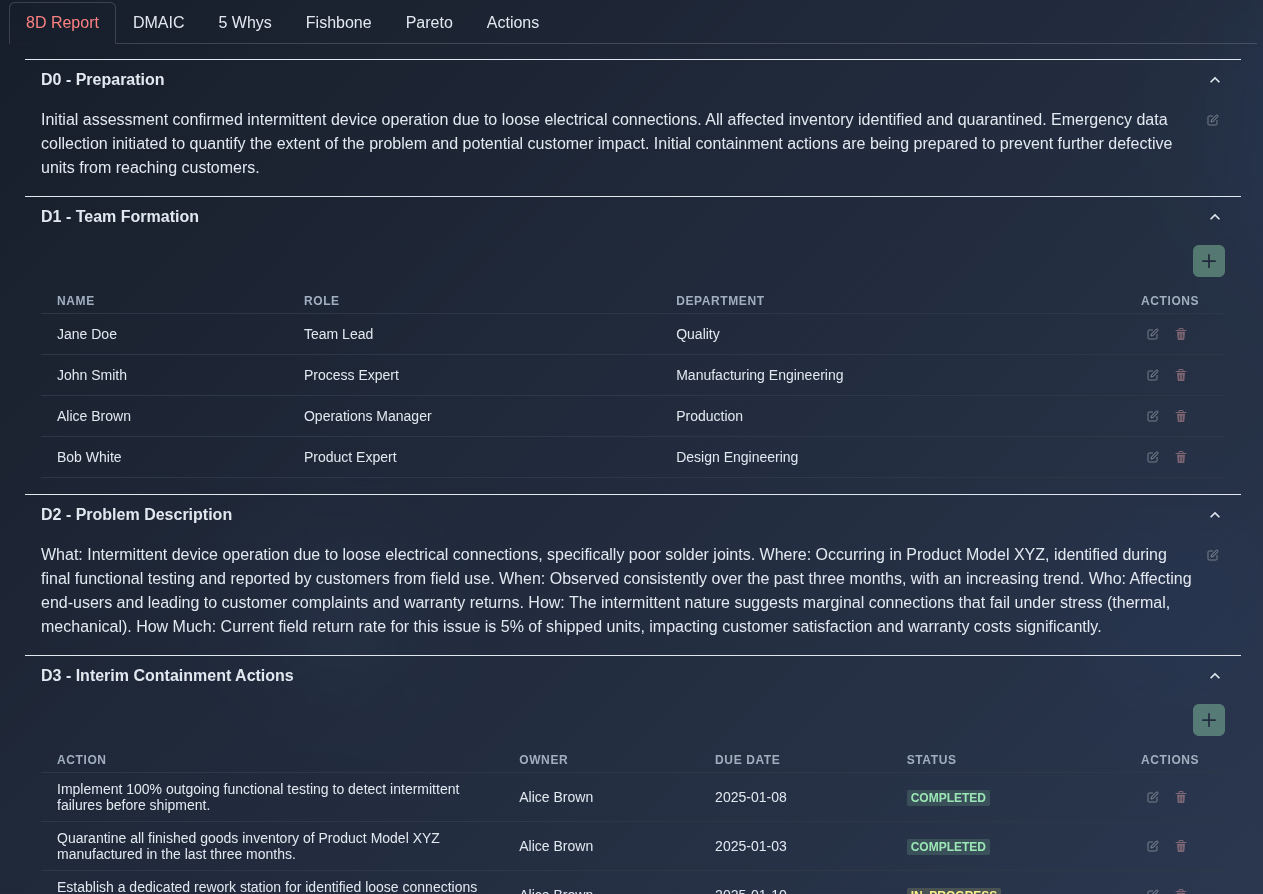
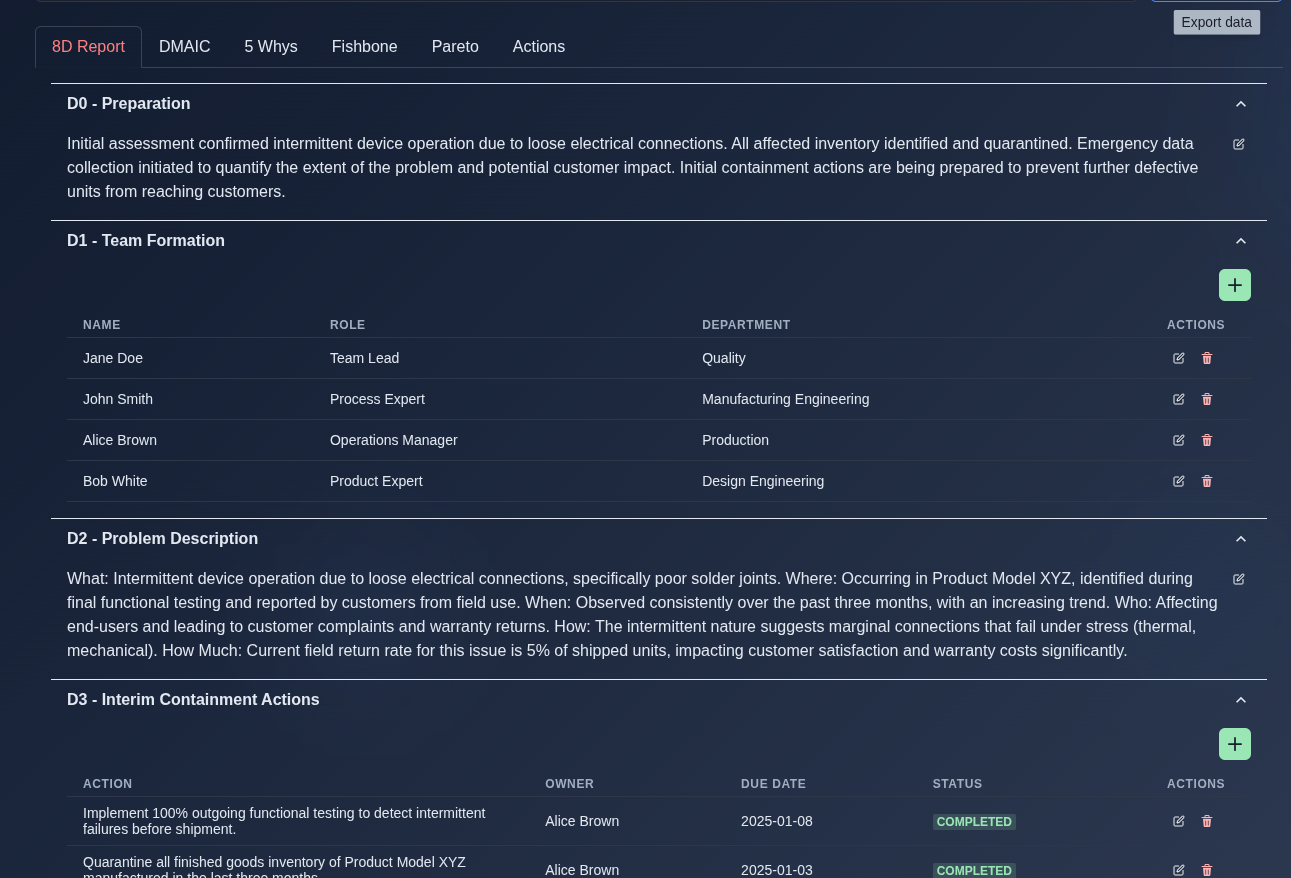
8D Report. → Review the generated 8D Report across the D0–D8 sections, including D0 - Preparation for the initial assessment and containment planning; D1 - Team Formation for the cross-functional team and assigned roles; D2 - Problem Description for the What, Where, When, Who, How, and How Much details of the problem; D3 - Interim Containment Actions for immediate actions taken to control the issue; D4 - Root Cause Analysis for identified root causes and contributing factors; D5 - Permanent Corrective Actions for actions required to eliminate the root cause; D6 - Implementation & Verification for verifying the effectiveness of corrective actions; D7 - Preventive Actions for measures to prevent recurrence across similar products or processes; and D8 - Team Recognition for documenting team contributions and lessons learned.
▶ 8D Report▼ 8D Report
-
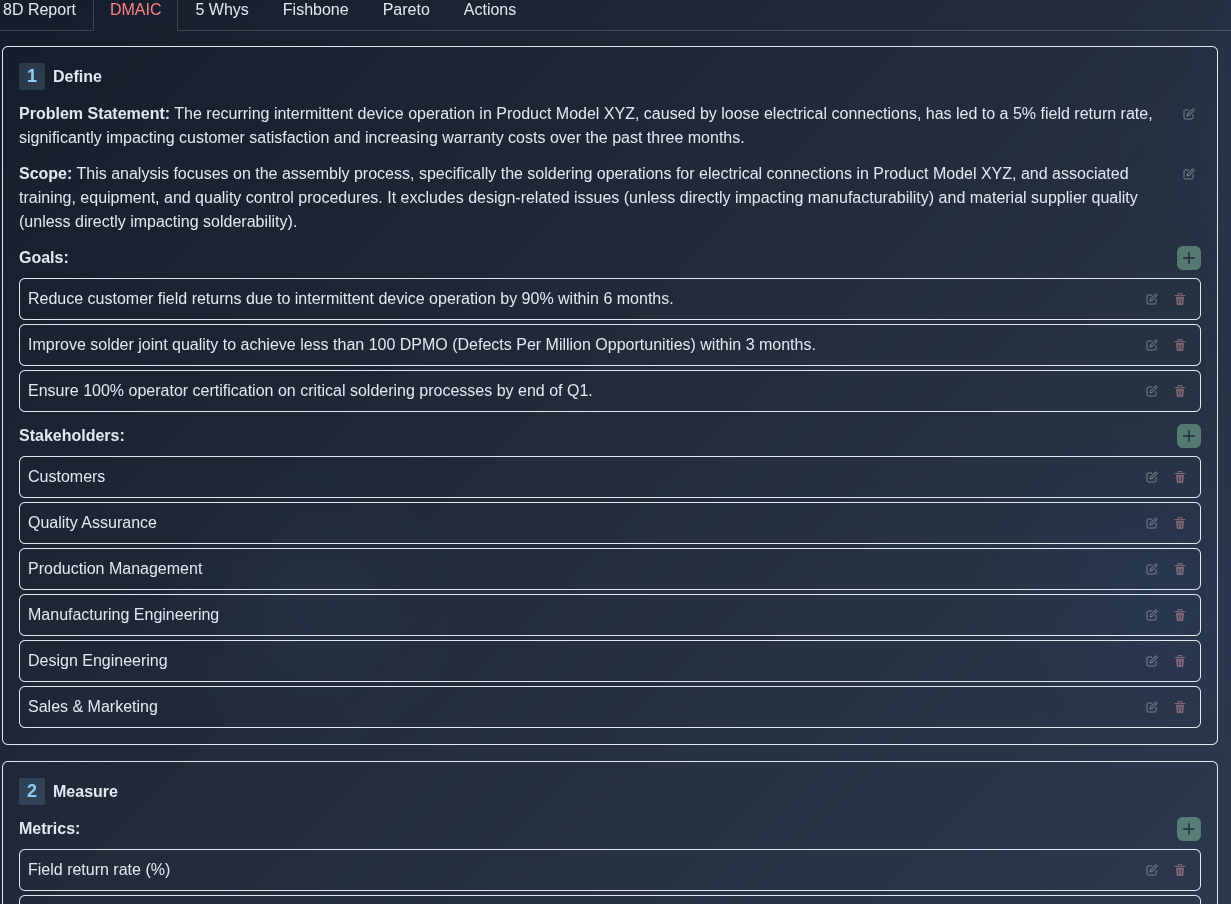
DMAIC analysis. → Review the generated DMAIC analysis, which provides a structured view of the problem, supporting data and metrics, identified causes, improvement activities, and controls for sustaining the results.
▶ DMAIC analysis▼ DMAIC analysis
-
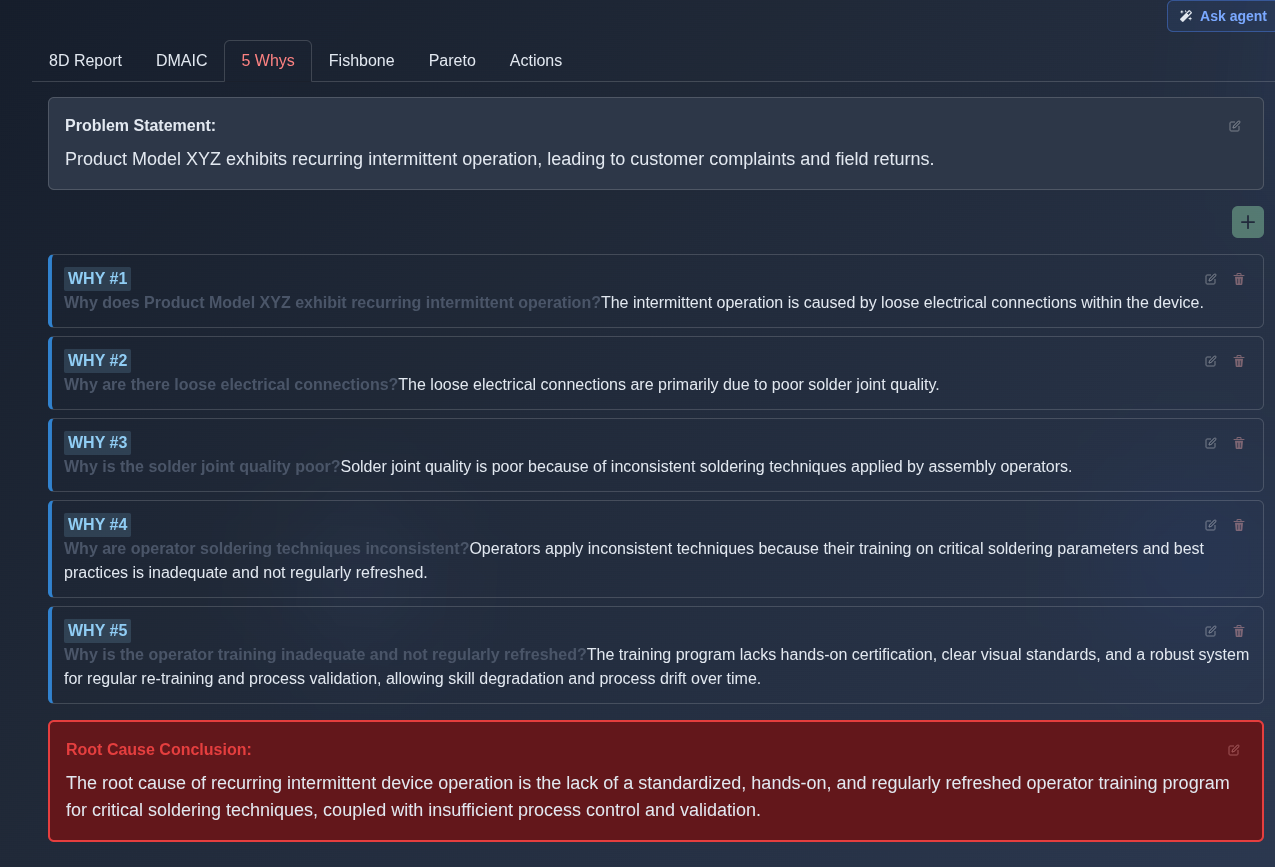
5 Whys analysis. → Review the generated 5 Whys analysis, which presents the problem statement, a sequence of five “Why” questions and corresponding answers, and the root cause conclusion.
▶ 5 Whys analysis▼ 5 Whys analysis
-
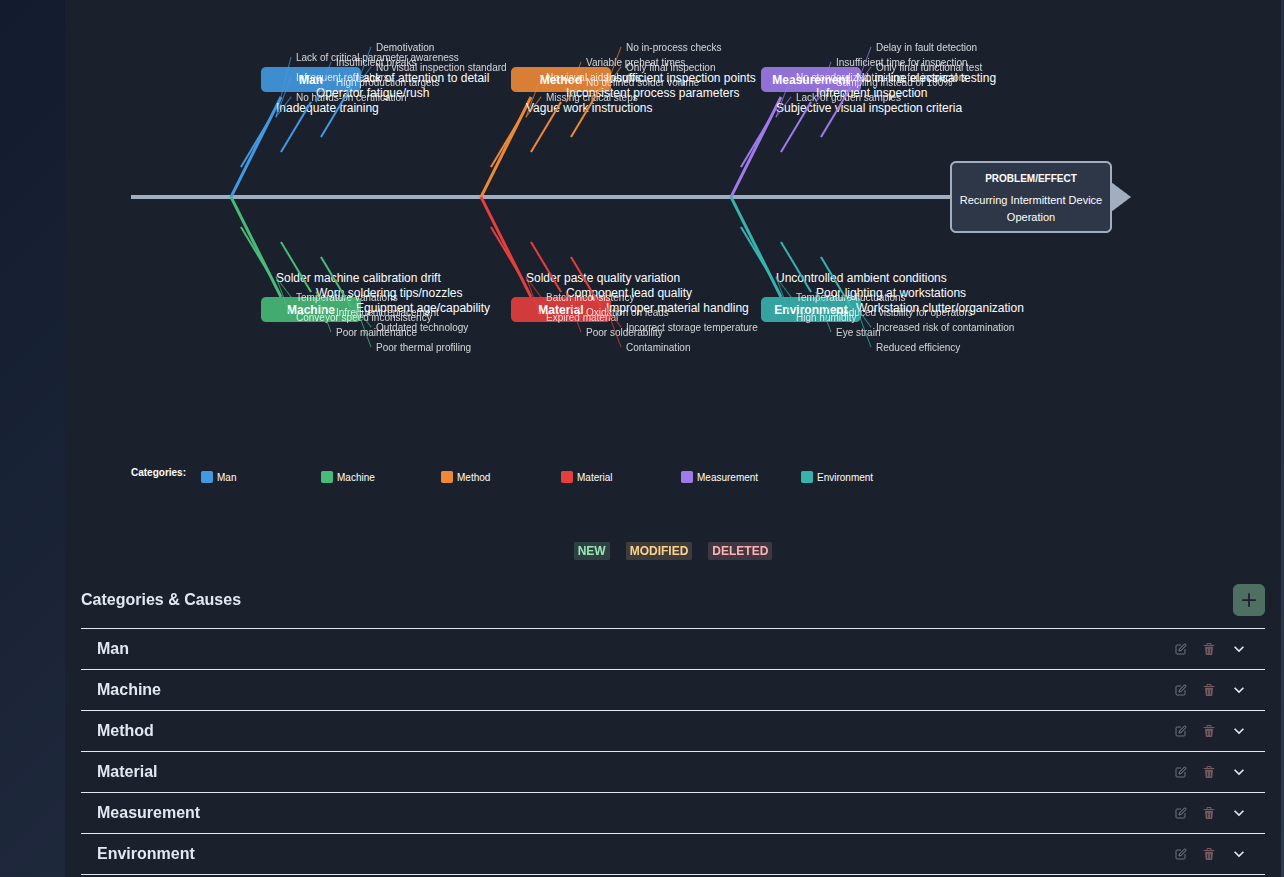
Fishbone analysis. → Review the generated Fishbone analysis, which visually maps the problem or effect at the end of the main horizontal line and branches into major cause categories such as Man, Machine, Method, Material, Measurement, and Environment. Each category branches into individual potential causes, allowing you to trace and organize contributing factors that may lead to the identified problem or effect.
▶ Fishbone analysis▼ Fishbone analysis
-
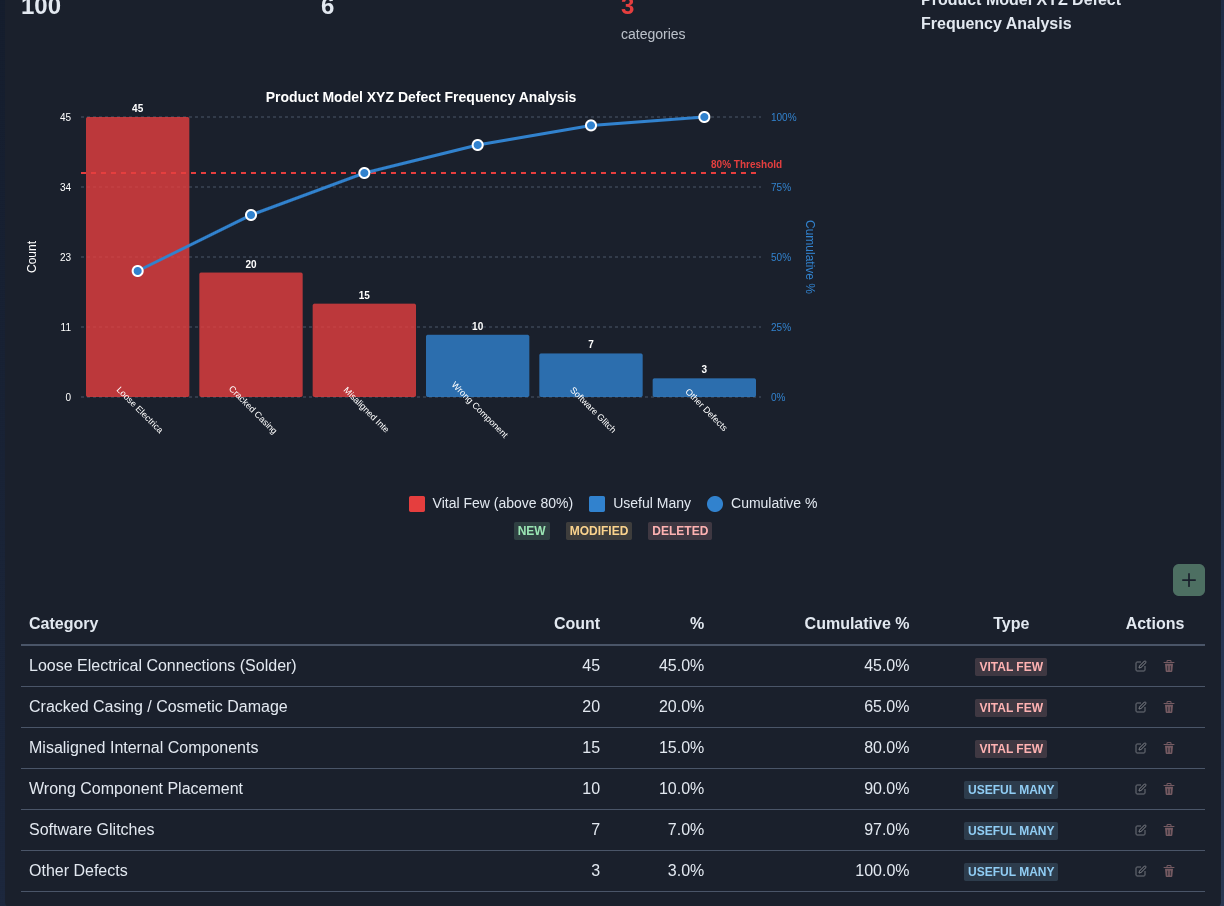
Pareto analysis. → Review the generated Pareto analysis, which displays defect categories in descending order of frequency using bars and shows the cumulative percentage using a line. The chart identifies the “Vital Few” categories that contribute to the majority of defects and the “Useful Many” categories that contribute to the remaining defects, with an 80% threshold used to distinguish the priority categories. The table below the chart provides each category’s count, percentage, cumulative percentage, and type.
▶ Pareto analysis▼ Pareto analysis
-
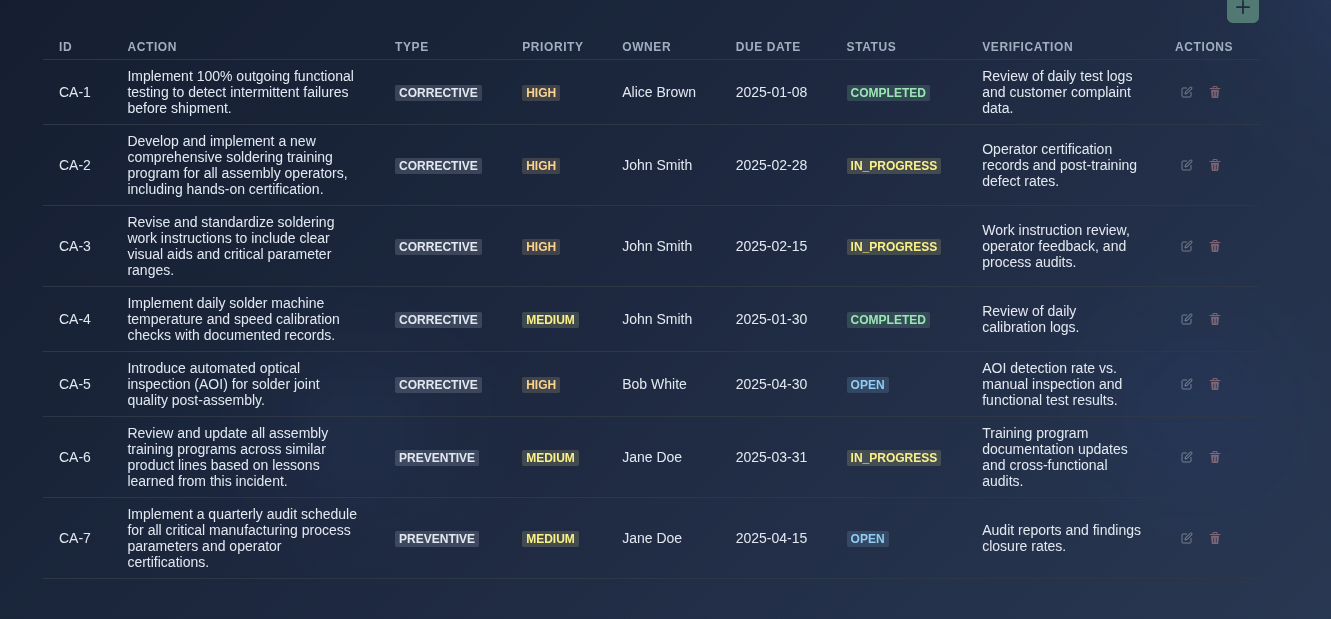
Corrective and preventive actions. → Review the action items generated from the RCCA analysis, including the action ID, action description, type, priority, owner, due date, status, and verification criteria, to track the implementation and effectiveness of each corrective or preventive action.
▶ Corrective and preventive actions▼ Corrective and preventive actions
-
Add, edit, or delete entries. → Use the Add, Edit, and Delete controls available across the RCCA tabs to manage the corresponding entries. For AI-generated RCCA, these controls are available only in follow-on mode and are disabled in the main prompt view. For manually created RCCA, the Add, Edit, and Delete controls are available directly in the main document view.
▶ Add, edit, or delete entries.▼ Add, edit, or delete entries.
-
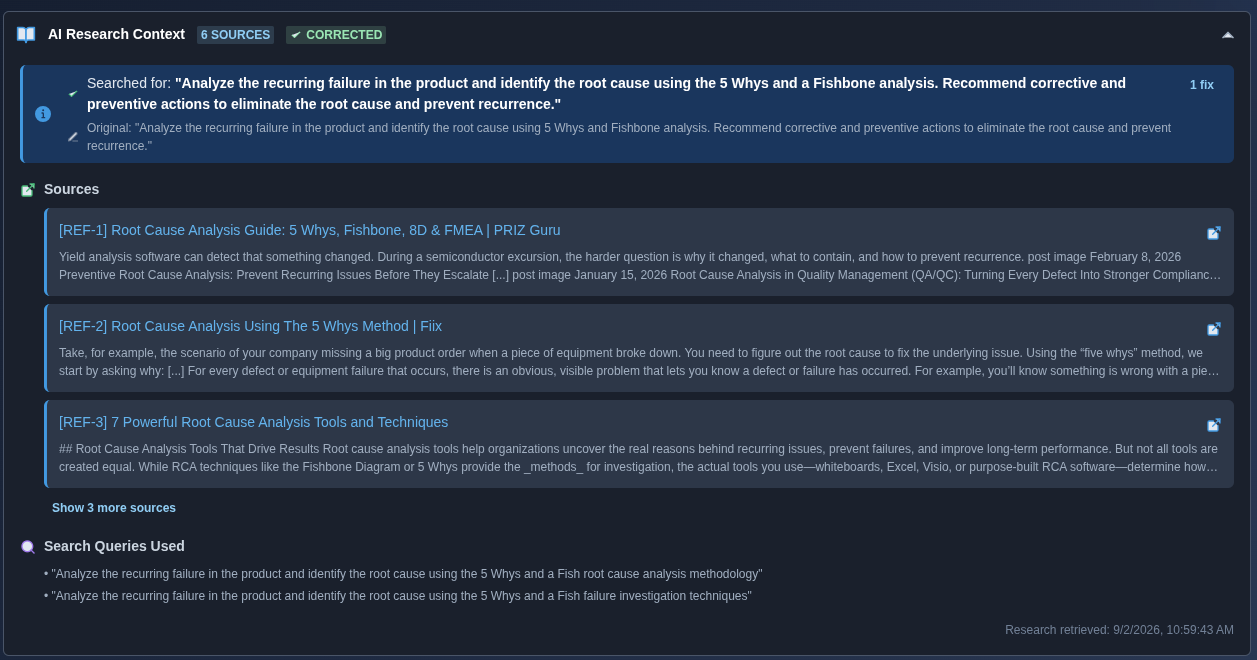
AI Research Context. → Open “AI Research Context” to review the research information used by the AI, including the sources consulted, the search queries used, and any corrections applied to the generated analysis. Review the listed sources and their supporting information to understand the research context used by the AI.
▶ AI Research Context.▼ AI Research Context.
-
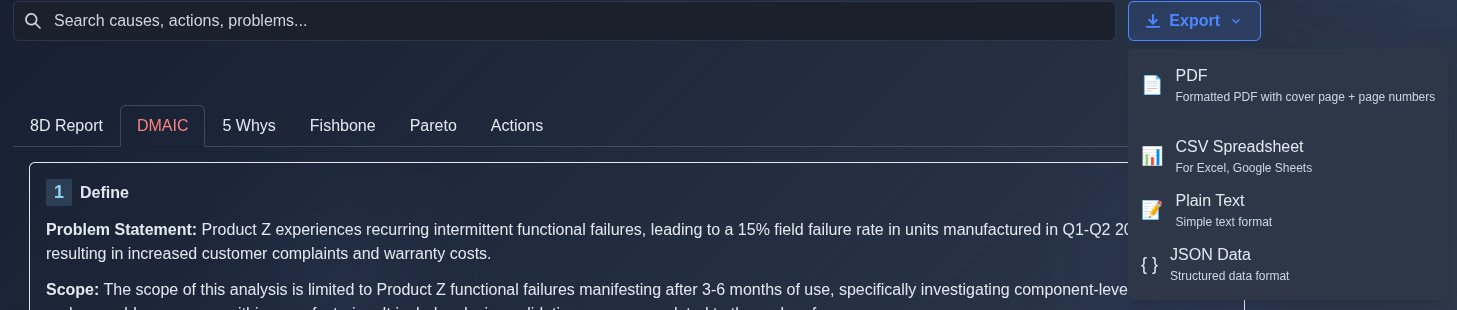
Export the RCCA analysis. → Click “Export” and select the required output format: “PDF” for a formatted document with a cover page and page numbers, “CSV Spreadsheet” for spreadsheet-compatible data, “Plain Text” for a simple text-format file, or “JSON Data” for structured data.
▶ Export the RCCA analysis.▼ Export the RCCA analysis.
Mechanics
- Six tabs: 8D Report · DMAIC · 5 Whys · Fishbone · Pareto · Actions
- Interactive Fishbone and Pareto diagrams
- Pre-generation clarification questions for AI
- Add · Edit · Delete controls across tabs
- AI-generated content editing is available in follow-on mode
- Manual content editing is available directly
- NEW · MODIFIED · DELETED badges with Undo
- AI Research Context with sources and search queries
- Export: PDF · CSV · TXT · JSON